

I love AppleScript. I consider it to be the canonical case study in how not to design a programming language. It has its own beauty, like a spectacular sunset after a major volcanic eruption in some part of the world you’ve never heard of. And no more summer1 for you.

Must Be in the Loop to Even Loop
AppleScript has this concept of a “reference.” The feature has a number of almost fatal flaws, but if you know what you are doing, it still might be useful in some non-trivial cases. Pro stuff.
Yet the creators of the language decided that this ball of radioactive magma is exactly what any novice needs and crammed it right into the repeat with anItem in aList loop statement.
The goal was to provide a way to change the current item directly in the list being iterated over—that is, in place—using only the loop variable. And, evidently, it was deemed necessary to “keep things simple” by not introducing the reference concept explicitly, with syntax such as *ptr, so as not to scare off a potential novice. Everything is hidden:
set aList to {1, 2, 3}
repeat with anItem in aList
  log anItem
end repeat
anItem is actually a reference, but you couldn’t know it unless you read the docs. Whenever the actual value is needed, the reference is implicitly resolved, and you wouldn’t notice a thing. Nice!
set aList to {1, 2, 3}
repeat with anItem in aList
  if anItem ≠ 2 then
    log "do something destructive with the item: " & anItem
  end if
end repeat
Everything looks good. But this natural approach doesn’t work—to the surprise of pro programmers and novices alike. The inequality test above is always true.
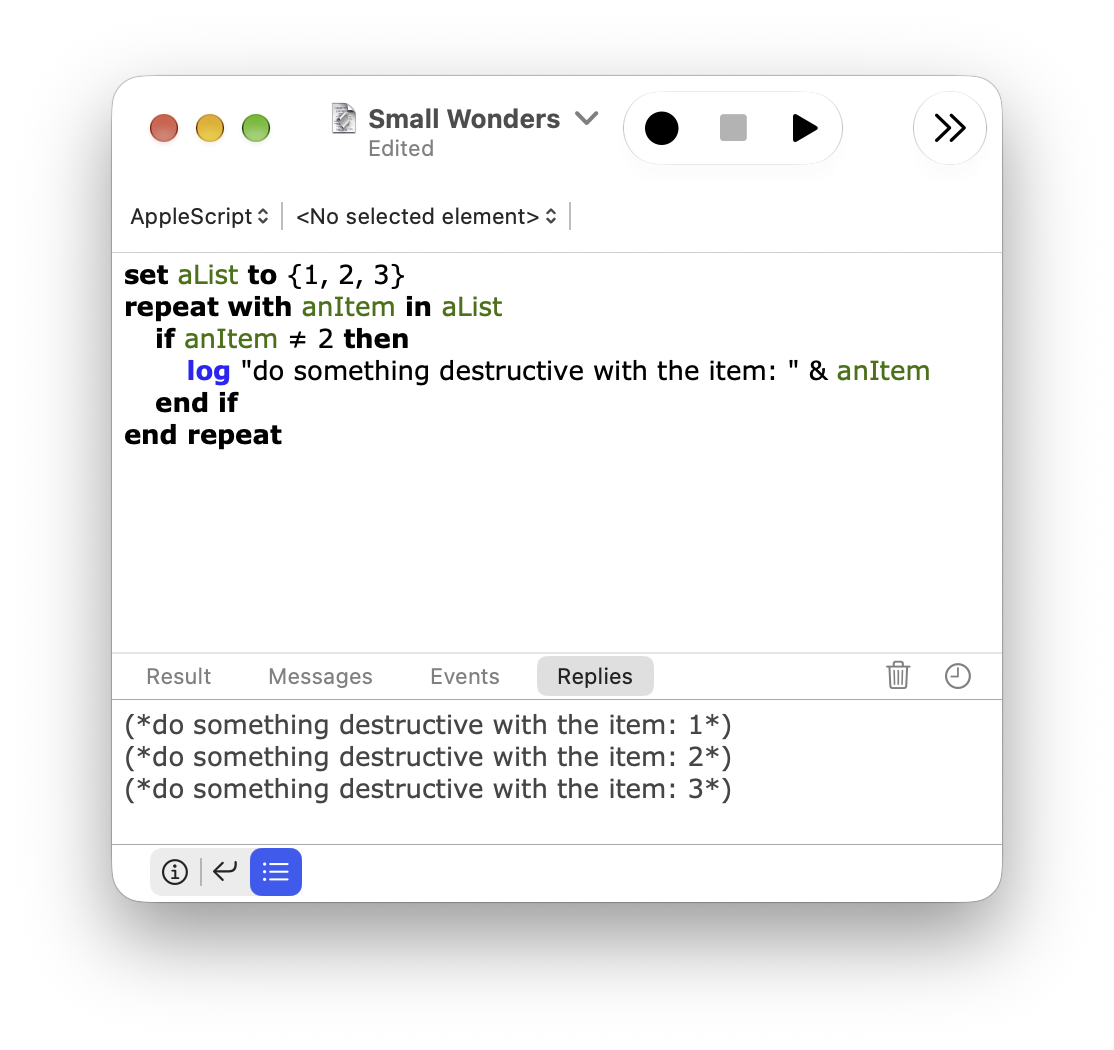
And if you do try to figure it out, the system will actively resist your efforts. log anItem and log 2 both produce (*2*) in the Log pane. class of anItem reports integer, just like class of 2. And yet, somehow, anItem = 2 is not true.
The reference nature of anItem is thoroughly hidden everywhere… except in the most prominent context imaginable. And there is no official way to find out what the fuck is really in the variable.
anItem is thoroughly hidden everywhere… except in the most prominent context imaginable. And there is no official way to find out what the fuck is really in the variable.Here is an unofficial way to check whether a value is actually a reference.
on isReference:valueToTestAsRef
  try
    valueToTestAsRef as reference
    return true
  on error
    return false
  end try
end isReference:

set aList to {1, 2, 3}
log (my isReference:aList) -- false
log (my isReference:(a reference to aList)) -- true

tell application "Finder"
  set aVar to desktop
  log (my isReference:aVar) -- true
end tell
By the way, there is a little glitch. If the script happens to use a script library, the word reference will be rendered as specifier. A terminology discrepancy straight from the creators of the language. The words in this language aren’t exactly real either; their hidden codes are…
You might get a hint of what’s going on if you notice that anItem = anItem is true. The magma from the Hadean deeps of AppleScript has successfully erupted to the surface. That’s what this is.
See, for some unknown, undocumented, but surely reasonable3 reasons, in the context of an equality test, a reference just happens to remember that it’s a specifier in its own right, and the equality test turns into an identity check.
What a way not to scare a potential user off!
But at least we gained the ability to modify the list in place, right? Let’s try the natural-looking approach again. Surely the syntax should be consistent with the way you assign values to an app’s properties.
-- inspirational snippet
tell application "Finder"
  set frontmost to true
end tell

set aList to {1, 2, 3}
repeat with anItem in aList
  set anItem to anItem * 10
end repeat
aList
Result:
{1, 2, 3}
It compiles, it runs, but it does nothing. To the uninitiated, this is clear as mud.
To understand what is happening here, first you need to get rid of the notion that variables “hold” anything. In AppleScript, they are merely labels for places that actually hold values. Temporarily attached labels. When you assign a value to a variable, the place it previously labeled is not changed at all; the label is simply reattached to another place. This is what the set statement does when its target is a variable.
But then, how do you really assign a value to a place—actually changing what that place holds? We do want something like this to work:
tell application "Finder"
  set frontmost to true
end tell

set aVar to application "Finder"
set aVar's frontmost to true

set aList to {1, 2, 3}
set item 1 of aList to 10

set aRec to {a:1, b:2}
set aRec's a to 10
It’s not just shuffling labels. Semantically, this is a completely different operation. Yet AppleScript manages to hide the distinction behind a single set statement.
The solution its creators came up with is not without a certain hacky elegance. The set statement looks at the expression to the left of to. If that expression is a variable4, it shuffles labels. If it is a reference expression, it performs a real assignment to the place the reference denotes.
Thus, in set aVar's frontmost to true, an actual assignment takes place. The same is true of set frontmost to true, despite appearances. Superficially, frontmost looks like a variable, but that is merely an effect of the tell statement syntax. Here is an equivalent form of the snippet:
using terms from application "Finder"
  set (frontmost of application "Finder") to true
end using terms from
All is well and good until a variable labels a place holding a reference and you want to assign a value to the place that reference denotes—exactly the case with our loop variable. The conflation of the two operations in a single statement has come back to bite us. But don’t worry: hack maestros to the rescue. All we need to do is pretend to the set statement that it is dealing with an expression rather than a variable.
Please welcome the contents property! By itself, it does nothing5: it simply returns its operand unchanged. But that is enough to fool the set statement:
set aList to {1, 2, 3}
repeat with anItem in aList
  set contents of anItem to anItem * 10
end repeat
aList
This hack patches the broken equality test too. As part of an expression, contents of anItem causes the reference in anItem to be resolved to its value while leaving other types of values intact. Thus, the equality operator compares a value with a value rather than a reference with a value, regardless of whether anItem is a reference or a normal value.
set aList to {1, 2, 3}
repeat with anItem in aList
  if contents of anItem ≠ 2 then
    log "do something destructive with the item: " & anItem
  end if
end repeat
So all is good! Except that they traded an obvious, natural syntax for an awfully obscure one and set the stage for countless bugs caused by people simply forgetting to write the frigging contents.
They could at least have made those bugs discoverable at runtime. The loop variable could have been implemented to detect attempts to assign to it directly; it need not have remained in scope after the loop; and its direct use in an equality test could have been forbidden. None of these measures would have required a language redesign. But no—not so much as a guardrail around the pit. Fuck the stupid user for committing the grievous sin of ever forgetting the shiny contents pattern. Let him learn from his pain!
And not everything is completely good, actually.
tell application "Finder"
  -- same as just "windows"
  contents of windows
end tell
Works as expected.
tell application "Mail"
  contents of windows
end tell
“Mail got an error: Can’t get contents of every window.”
See, AppleScript cannot form a reference to a reference; any such chain is flattened into a single reference. The expression contents of windows does not evaluate contents as a property of the windows of application "Mail" reference. Instead, it forms a single contents of windows of application "Mail" reference and sends it as is to the target application for evaluation. The Finder happens to handle it, but Mail does not. Luckily, when a reference is accessed through a variable, AppleScript gets the first turn at handling the property:
tell application "Mail"
  set aVar to a reference to window
  -- this does work
  contents of aVar
end tell
However…
tell application "DEVONthink"
  set aVar to a reference to windows
  contents of aVar
end tell
“DEVONthink got an error: Can’t get every content of every window.”
This app managed to redefine the word content as a class name in its terminology dictionary, with contents as its plural form. Somehow AppleScript allows that. The fix:
tell application "DEVONthink"
  set aVar to a reference to windows
  using terms from scripting additions
    contents of aVar
  end using terms from
end tell
Simple, my ass. But hey, all of those are just corner cases. Who cares!
Let’s look at this script. It gets a list of Finder windows and modifies it in place, replacing each reference with the corresponding window’s name. It works.
tell application "Finder"
  set aList to windows
  repeat with aWindow in aList
    set aName to name of aWindow
    set (contents of aWindow) to aName
  end repeat
end tell
aList
Now let’s make a little, innocent-looking change. Let’s put the list inside a record.
tell application "Finder"
  set aList to windows
  set aRec to {aList:aList}
  repeat with aWindow in aRec's aList
    set aName to name of aWindow
    set (contents of aWindow) to aName
  end repeat
end tell
aList
“Can’t set item 1 of aList of {aList:{…}}”
I don’t know what causes this bug. But I do know that this kind of shit tends to happen when corner cases are systematically ignored.
References to Variables
Reassigning a handler parameter does not reassign the caller’s variable. The value from the labeled place is passed, not the label itself. But what if we use a reference object to pass the label?
on makeGoodNotEvil(aRef)
  if contents of aRef = 666 then
    set contents of aRef to missing value
  end if
end makeGoodNotEvil

set aVar to 666
my makeGoodNotEvil(a reference to aVar)
if aVar is missing value then log "Exorcised!"
It works! Let’s use this neat feature everywhere.
on test()
  set aVar to 666
  set aRef to a reference to aVar

  -- prints (*aVar*)
  log aRef

  -- error: "Can’t make aVar into type reference."
  contents of aRef
end test

my test()
“Can’t make aVar into type reference.”
“WTF?” you might politely ask.
No, it’s not a bug that references to local variables don’t work; it’s a “feature” that references to the run handler’s pseudolocal variables do.
See, AppleScript was specifically optimized for very simple scripts. So the fact that code outside explicit handlers forms the implicit run handler of the top-level script is hidden.
Even more thoroughly hidden is the fact that the “local variables” of the run handler are actually properties of the top-level script.
run handler are actually properties of the top-level script.The “local variables” of the run handler are just script properties with scope propagation removed.
on aHandler()
  -- unlike a normal property, aVar does not work by itself
  aVar of me
end aHandler

set aVar to 10
my aHandler()
-- 10
Yet another dirty hack.
The a reference to aVar from the first snippet is actually a reference to aVar of me and is therefore resolvable everywhere in the script. If you do not dabble with handlers too much, references to “variables” kinda work.
But if you do, exactly the same a reference to aVar expression starts to behave differently.6 In the second snippet, aVar is indeed local to test. AppleScript does create a reference to it—it even gets dumped by the log command—but any attempt to resolve it leads to a runtime error. In this context, a reference to aVar is equivalent to a dangling pointer in other languages.
Simple!
Instead of references, I would recommend using records.
The effect would be practically the same, but the intent is clear from the code and no unwelcome surprises arise along the way.
on myHandler:params
  set {a, b} to {a, b} of params
  set a to a * 10
  set b to b * 10
  return {a:a, b:b}
end myHandler:

on testRefSemantics()
  set a to 1
  set b to 2

  my myHandler:{a:a, b:b}
  set {a, b} to {a, b} of result

  log "a=" & a
  log "b=" & b
end testRefSemantics

testRefSemantics()
False Simplicity
Judging from the design choices that were made, I construe the main premise behind AppleScript’s design as something like this:
Let’s pretend that complexity does not exist. If the pretense requires the design to become polluted with corner cases and loaded with bear traps, and its real mechanics to become incomprehensible—so be it. Anything to lure novices into trying scripting and not scare them off with the prospect of mental effort!
AppleScript is littered with this imaginary simplicity, and the design of the set statement is as good an example as any.
Alternative designs for assignment are possible. For example, the current set statement could be split into separate label and set statements, offering a more coherent mental model. But this model would look more complex at first glance. It would require introducing a clear distinction between a value and a reference/pointer right from the start, even before the first script is written. And that is a no-no.
A certain someone once said something like, “Design is how it works, not just how it looks.” Simple design is simple in use. In action—not when admired from afar. This is the direct opposite of AppleScript’s design ethos… but if you’re blinded by a cute idea, you’re blind.
The whole cutesy-cutesy idea that “AppleScript is just like English” reeks of this craziness7. It’s a pretense, divorced from reality. From afar, an AppleScript script might look like some kind of English if you squint. But to write a script, you need to use precisely the right words in precisely the right order, with absolutely precise and alien punctuation—and none of that is obvious. The form obscures the structure instead of clarifying it. And it takes its toll.
You might sail through writing a simple script without knowing much. But as soon as you venture beyond the absolutely trivial, you’re screwed. Heck, you can’t even write a frigging loop without reality coming to bite you.
And you are left all alone with it, because the documentation follows the same “do not complex thy neighbor” approach. As if pretending that problems do not exist would somehow make them go away not only from the minds of AppleScript’s creators but also from users’ scripts.
The main text8 is the AppleScript Language Guide9. It explains some things but glosses over many “unimportant” details. Most of the vital facts are simply undocumented; those that are documented are scattered here and there throughout the reference part of the book. To understand the system, you need to parse the entire documentation, pick them out, and piece them together like a puzzle, filling the numerous gaps through experimentation. There are not many lunatics out there who would ever do that. Most would make the sane choice and back off. And if it hadn’t been for Matt Neuburg’s excellent book10, which filled some crucial voids, I would have given up too.
No wonder AppleScript failed to thrive. AppleScript is unnecessarily complicated by design. That alone puts off potential adopters, even before you take into account the implementation’s more-than-fair share of bugs.
So when AppleScript’s monopoly on Mac automation ended—unlike classic Mac OS, Mac OS X came with a real Unix command line—not many new users jumped on the bandwagon.
There was a time when AppleScript wasn’t consigned to obscurity as “almost deprecated” legacy stuff. It was featured at WWDC several times, and you could even develop apps with AppleScript in Xcode.11 The opportunities to evolve it into something truly good were there, but they were missed.
The pace of change was glacial and the quality of the products mediocre. They were limited, convoluted12, and/or buggy13 to the point of questionable usefulness. And I would dare to state that the stubborn refusal to accept the fact that AppleScript is a bad and inadequate tool for novices and pros alike was the biggest factor that shaped the outcome.
Toward the end, the obvious idea of a JavaScript alternative to AppleScript somehow managed to take root at Apple and produce JXA. But it was too little, too late. After a decade of “not much,” if not “nothing,” happening in the automation department, the whole shebang was scrapped.14 It’s a sad outcome, but I can understand the management…
Most of the automation technologies of the time—AppleScript, JXA, Automator, System Events, Script Editor, Script Libraries—were put into legacy survival mode. No more new features—only enough work to ensure that they remain more or less usable in subsequent macOS versions.
So yes. A truly educational catastrophe of a programming language.
Shane Stanley: “I discontinued AppleScriptObjC Explored mainly because too many complicated ASObjC Xcode projects ended in grief. Simpler stuff generally worked fine, but as people inevitably expanded them sooner or later memory issues would result in unexpected crashes. I felt I couldn’t in good conscience keep encouraging people to invest their time in it.” He also wrote: “AppleScript memory management is poor at the best of times, and worse with AppleScriptObjC.” ↩︎
The language designers must have considered those reasons reasonable—they did ship this behavior, after all. ↩︎
Or variables, in constructs such as
set {a, b} to aList. ↩︎Reference resolution happens when an expression is evaluated, but expressions on the left-hand side of a
setstatement are not, strictly speaking, evaluated. Resolving a reference for the purpose of evaluating an expression consists of two steps: (1) locating the place and (2) getting the value from it. On the left-hand side ofset, only the first step is performed. So yes, thecontentsproperty does nothing. ↩︎And do not expect to find a whiff of this behavior in the docs. ↩︎
“Reality does not exist” is the definition of craziness. ↩︎
There is also another, less ancient book, Mac Automation Scripting Guide. Instead of taking the opportunity to pass down much-needed advice about common issues, it focuses on some newly added features, and that’s it.
contents of someReferenceand the like are completely glossed over. “This is fine.” ↩︎This use of AppleScriptObjC in Xcode was de facto deprecated after a couple of years. It might have remained supported for longer had the AppleScript engine not been so buggy. The apps were plagued by memory leaks and sudden crashes.2 It’s OK-ish for a script that runs once to have slightly broken memory management, but that cannot provide a stable foundation for an app that runs for a long time. ↩︎
Am I the only one who finds Automator completely inscrutable and not really useful? Doesn’t look like it. ↩︎
Have you ever wrestled with System Events over GUI scripting? If you are a fan of entomology, you should. ↩︎